

How it works
How AutoProv works,from trade accountto the PDF in the deal file.
One account, one wallet, and a price on every check. This page walks through what a dealer does, in order, and what comes back at each step.
One vehicle, five checks, at Member prices. The top-up amount is an example.
How does AutoProv work?
You open a trade account, top up a wallet and pay for each check as you run it. There is no contract. Pick the vehicle, choose the checks you need, and read the results on screen. Every check produces a PDF report that stays in your account, ready for the deal file or the buyer.
Step by step
Five steps, in the order you do them.
Open a trade account
Register with your business details. AutoProv is for the motor trade: independent dealers, dealer groups, traders, brokers and auction buyers. It is not aimed at private buyers.
- /No contract and no minimum number of checks.
- /One account covers every check and every compliance tool.
- /Sign-up is instant, with no manual approval. You confirm your email address with a six-digit code we email you, and the account stays inactive until you do.
Top up the wallet
Add money to your wallet. Each check you run takes its price from the balance, so you only pay for what you use.
- /Member prices apply from the first check.
- /The Enterprise plan, at £30 a month or £300 a year, lowers the price of each check.
- /The minimum top-up is £50, paid by card. Wallet credit never expires.
Pick the vehicle and the checks
Inside your account, look up the vehicle you are buying or selling and choose what to run. Run one check, or stack several on the same car.
- /Provenance: finance, write-off, stolen and mileage. Add a data guarantee if the car's value calls for it.
- /Digital service history: retrieved by VIN from the manufacturer's system.
- /MOT history, valuation and build sheet.
Read the result
The price shows before you confirm. The result opens on screen, with anything that needs a second look placed first.
- /Provenance results read as clear, or as a counted issue with the detail behind it.
- /Service history reads as a timeline, so a gap between visits stands out.
- /Most checks come back straight away. A service history check can take up to five minutes and then appears in "My Reports" in your dashboard.
File the PDF
Every check produces a PDF report that is kept in your account. Download it for the stock record, or hand a copy to the buyer with the keys.
- /The report carries the date the check was run.
- /Open it again from your account if a question comes back later.
- /Reports stay in your account for as long as the account is open.
What leaves the wallet
A published price on every check.
You should not need a sales call to find out what a report costs. Member prices are pay as you go. Enterprise prices apply on the £30 a month or £300 a year plan.
A data guarantee can be added to a provenance check, from £10,000 to £50,000 of cover. The full list is on the pricing page.
AutoProv Ltd is not VAT registered. The prices shown are the prices you pay, and no VAT is added.
| Check | Member | Enterprise |
|---|---|---|
| Provenance check | £4.50 | £3.00 |
| Provenance with £10k guarantee | £5.50 | £4.00 |
| Digital service history check | £5.00 | £3.50 |
| Build sheet | £2.50 | £1.80 |
| Valuation | £0.50 | 80 free a month, then £0.50 |
| VIN lookup | £0.10 | Included |
| MOT history | Included | Included |
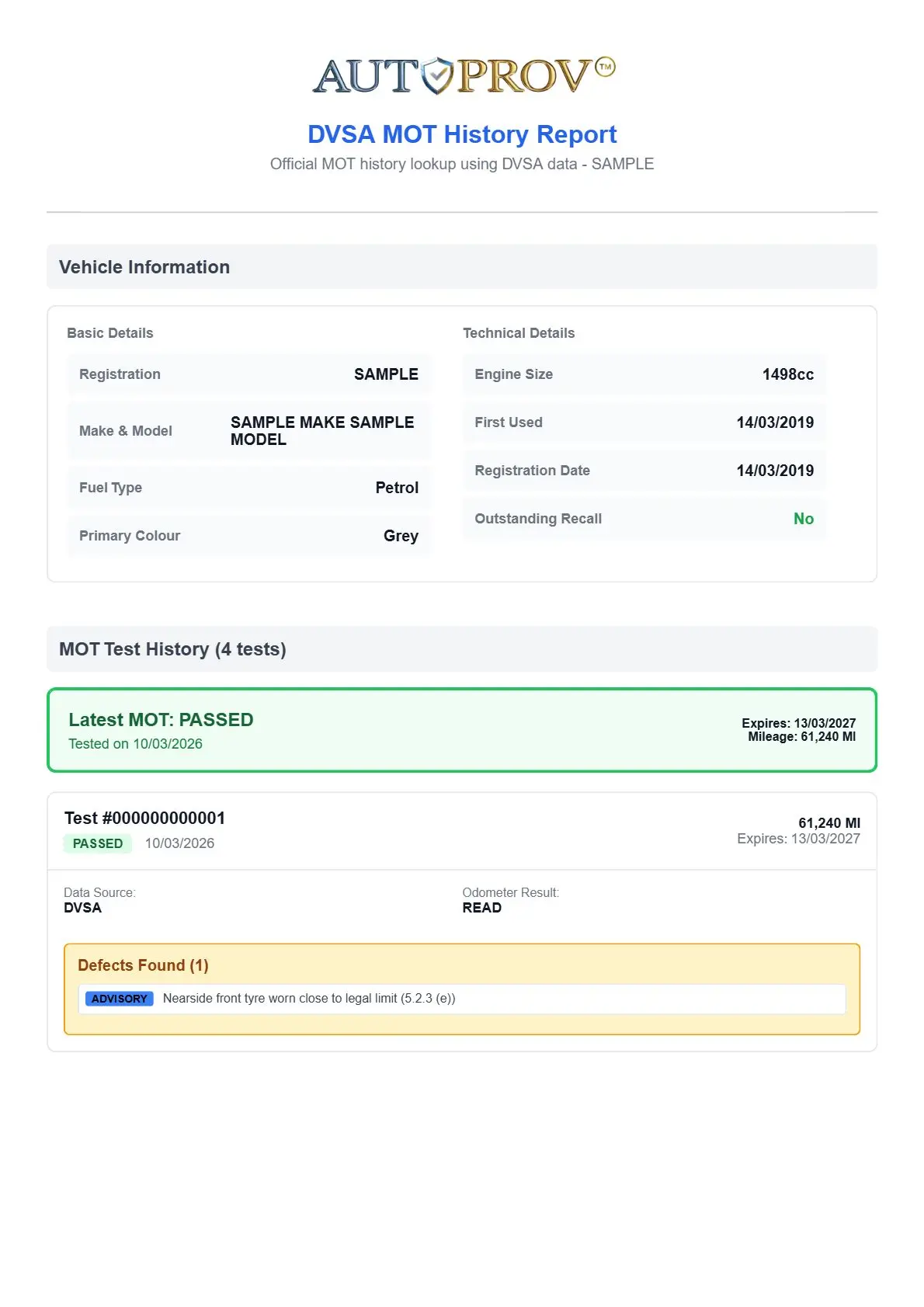
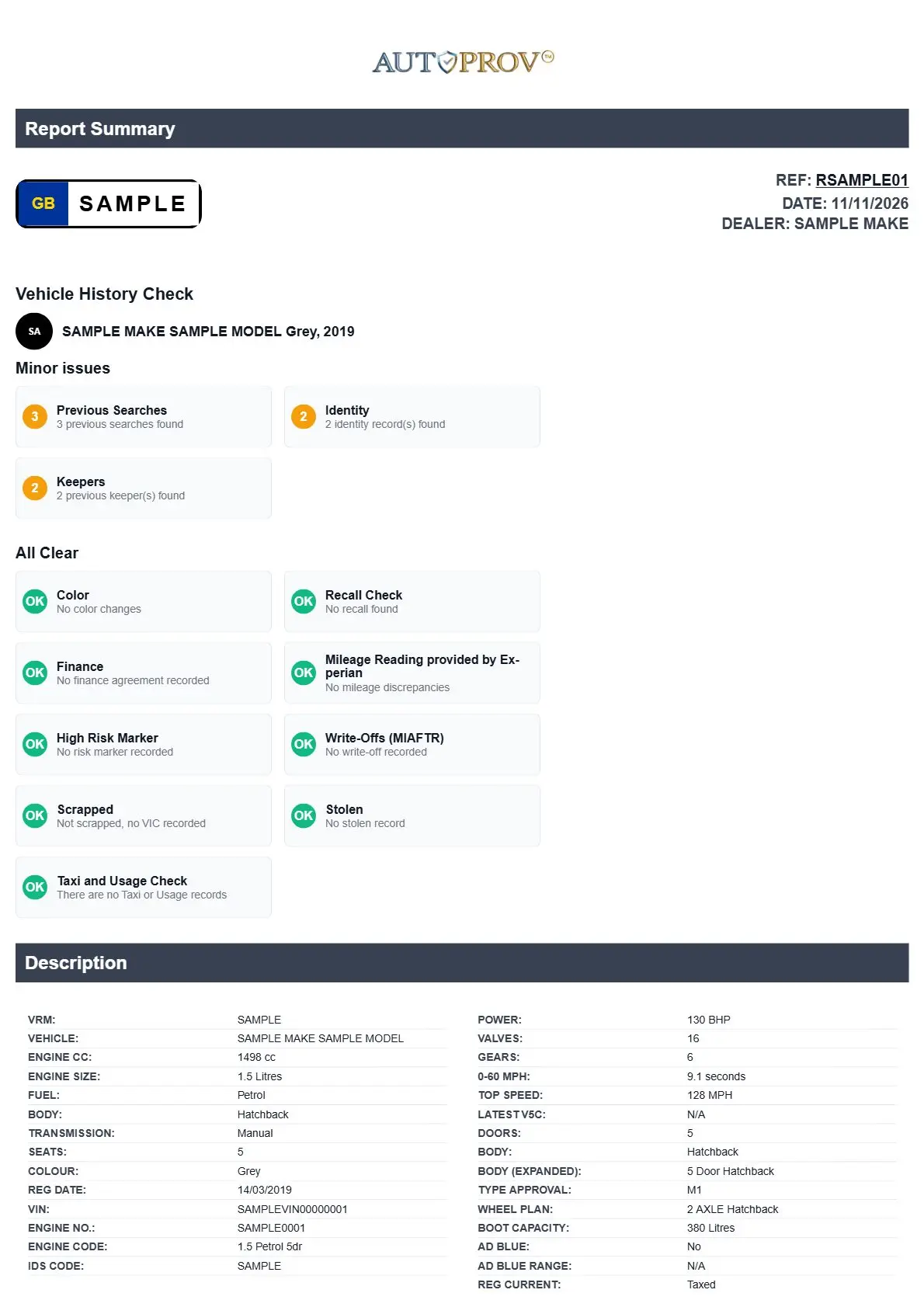
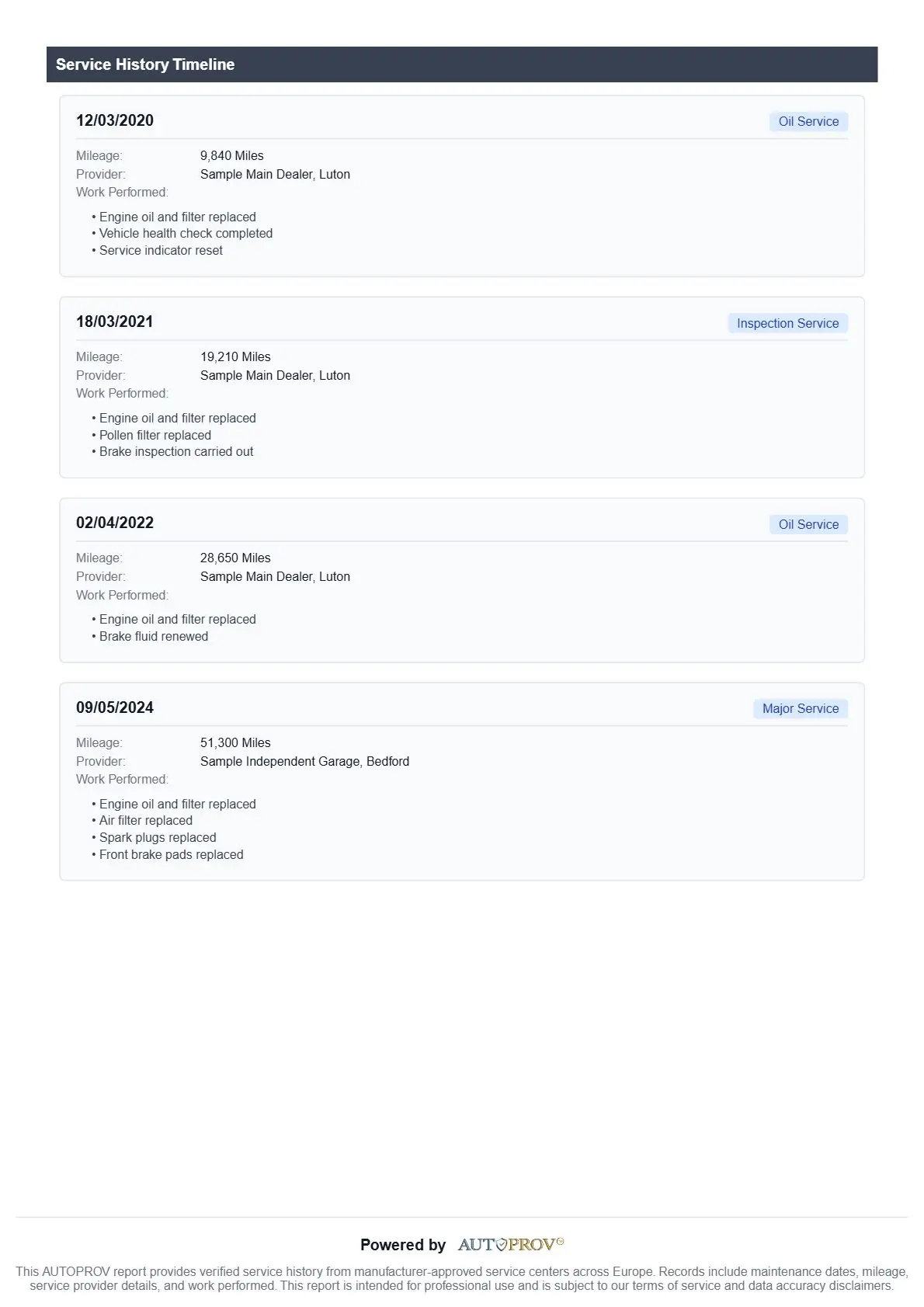
What you end up holding
A dated record of what you checked.
The PDF is the part that lasts. It shows what the sources held on the day you ran the check, and it is there when a buyer, a lender or your own records ask for it.
- 01Provenance summary with issues counted first
- 02Service history timeline with dates, mileage and work done
- 03MOT history with every pass, failure and advisory
These are the platform's real report layouts, filled with sample data.
After the checks, the sale paperwork.
The same account holds four tools for the sale itself. They help you keep a record. They are not legal advice.
Used vehicle PDI
A pre-delivery inspection report recording the car's condition when it leaves you.
Digital distance sale pack
The documents for a sale agreed at a distance, gathered in one pack.
Dispute response builder
A structured first reply to a customer complaint, drawn from the records you hold.
There is also remote vehicle appraisal: the seller films the car through a secure link, so you can see it before you commit. All four are on the compliance tools page.
Getting started, answered.
Who can open an AutoProv trade account?
AutoProv is built for businesses in the motor trade: independent dealers, dealer groups, traders, brokers and auction buyers. You register with your business details. It is not aimed at private buyers.
How does the AutoProv wallet work?
You add money to a wallet in your account and each check takes its price from the balance. There is no contract and no minimum number of checks. A provenance check costs £4.50 and a digital service history check costs £5.00 at Member prices.
Do I need a subscription to use AutoProv?
No. A Member account is pay as you go. The Enterprise plan is optional, at £30 a month or £300 a year. It lowers the price of each check, for example a provenance check from £4.50 to £3.00, includes VIN lookups and 80 free valuations a month.
Which checks can I run on one vehicle?
You can run a provenance check, a digital service history check, MOT history, a valuation, a build sheet and a VIN lookup. Run them one at a time or together on the same vehicle. Each has its own price and its own PDF report.
Where do I find a report after I have run it?
Every check produces a PDF report that is kept in your AutoProv account. You can download it for the stock file or give a copy to the buyer, and open it again from the account later.